How to fill out AS9102 Form 3
How to fill out AS9102 Form 3
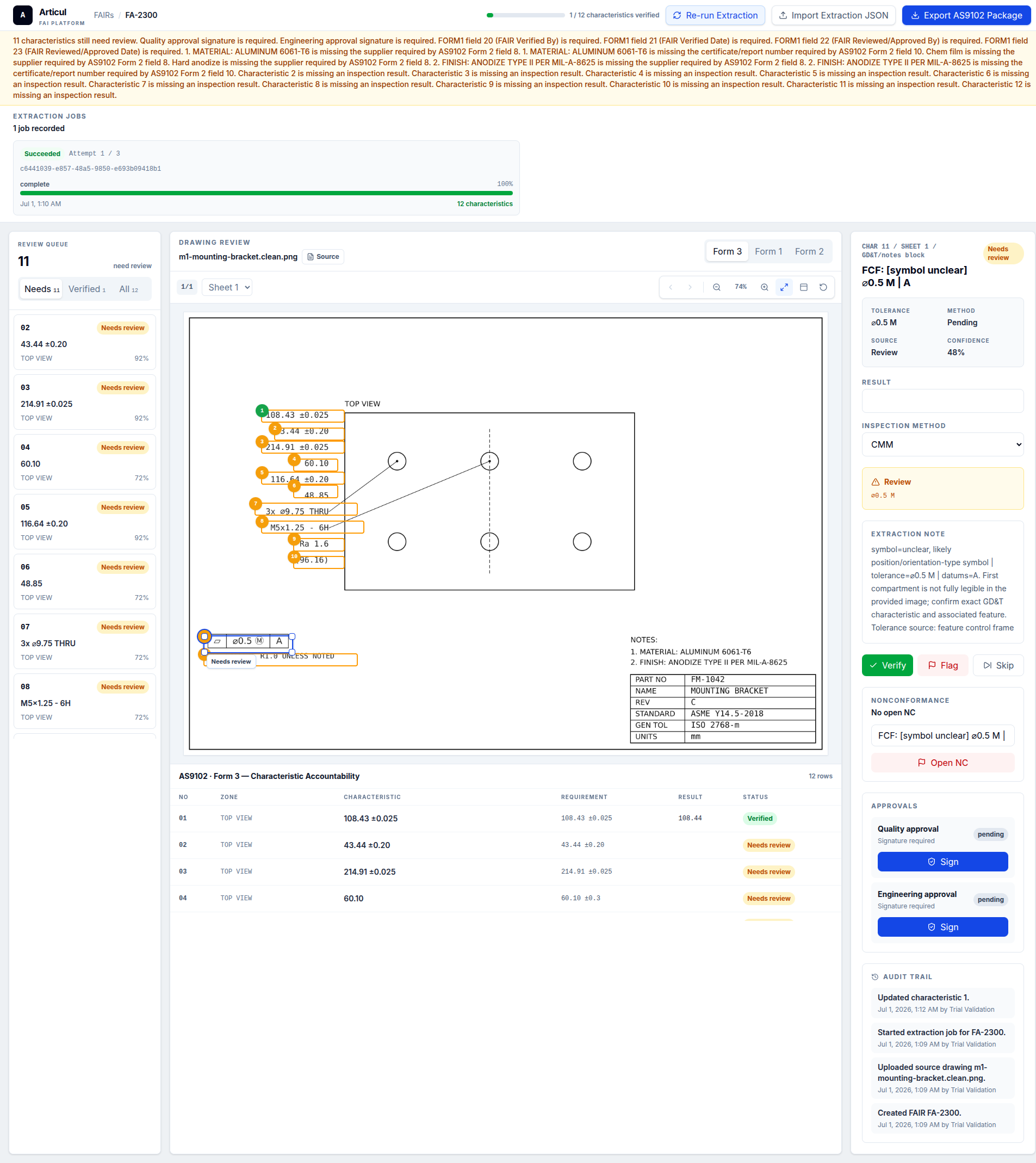
Form 3 is where drawing requirements become objective evidence. The safest workflow is to balloon first, create one row per characteristic, then inspect and record results against each row.
Updated July 2, 2026 · AS9102 Rev C · Ungated download
Step-by-step workflow
- Start with the final drawing revision and any referenced specifications.
- Balloon every characteristic, including notes and title-block tolerance requirements.
- Create one Form 3 row for each balloon.
- Enter the drawing requirement before inspection so the inspector knows the acceptance basis.
- Record measured results or attribute verification, then disposition any nonconformance.
Field guide
Field 1 - Part Number
Required. Example: BRK-1042. Carried from Form 1.
Field 2 - Part Name
Required. Example: Mounting Bracket. Carried from Form 1.
Field 3 - Serial Number
Conditional. Example: SN-0007. Required when serialized.
Field 4 - FAIR Identifier
Required. Example: FA-2300. Carried from Form 1.
Field 5 - Characteristic Number
Required. Example: 12. Matches the balloon number on the drawing.
Field 6 - Reference Location
Conditional. Example: Sheet 1 / B4. Sheet, zone, or model reference.
Field 7 - Characteristic Designator
Conditional. Example: Key. Critical, key, major, or customer designator.
Field 8 - Requirement
Required. Example: 0.250 +/-0.005 THRU. Requirement exactly as interpreted from drawing.
Field 9 - Results
Required. Example: 0.2498. Measured result, attribute result, or verified note.
Field 10 - Designed / Qualified Tooling
Conditional. Example: N/A. Only when tooling controls acceptance.
Field 11 - Nonconformance Number
Conditional. Example: N/A. Required for nonconforming results.
Field 12 - Additional Data / Comments
Optional. Example: CMM report 4421. Inspection reference or comment.
Characteristic designator vs characteristic number
The characteristic number is the balloon number. The designator is a classification such as key, critical, major, or customer-specific. Do not put the balloon number in the designator field.
Related AS9102 resources
Frequently asked questions
Can I write OK in Form 3 results?
Use measured values for variable characteristics. Attribute checks may use pass/fail or verified language when that is the correct acceptance evidence.
Where do GD&T frames go on Form 3?
Each GD&T requirement should be ballooned and recorded as a characteristic with its requirement, result, and any reference to the inspection report.
Changelog
July 2, 2026: Published the AS9102 Rev C page, download assets, completed example image, FAQ schema, and sitemap entry.
Turn the template into a reviewed FAIR package
Articul pre-fills Forms 1-3 from the print and routes anything uncertain to you, including drawing notes and title-block fields, while tying ballooned characteristics to source regions before export.
Upload a drawingHosted upload is for non-controlled drawings only. Do not upload export-controlled (ITAR/EAR) technical data to hosted; ask about self-host.