How to fill out AS9102 Form 2
How to fill out AS9102 Form 2
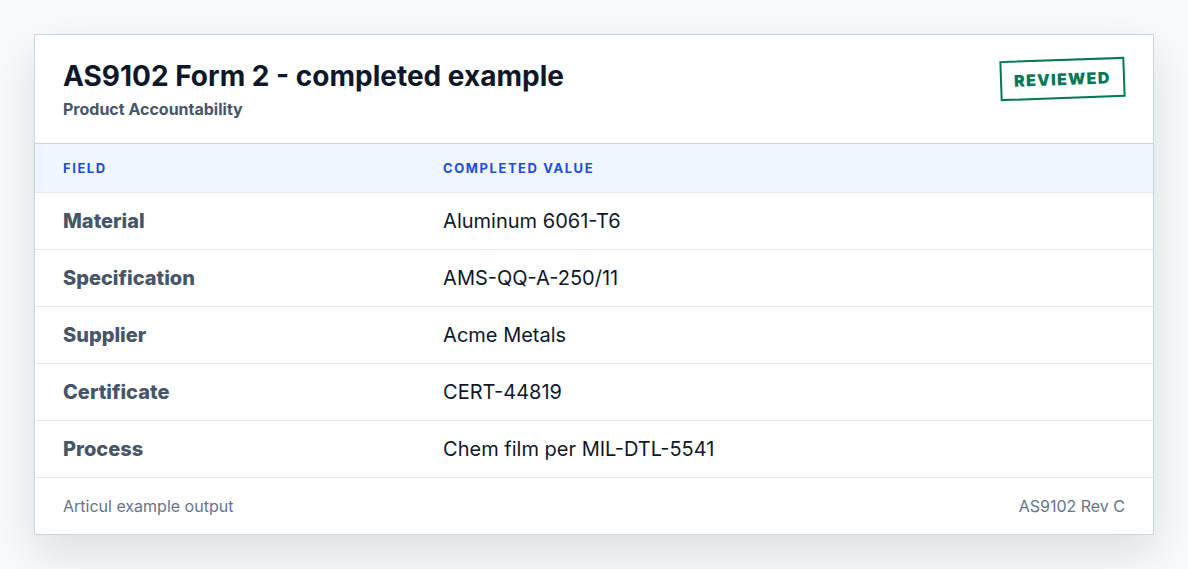
Form 2 is the evidence index for materials, special processes, and functional tests. It should make the chain from drawing note to supplier certificate easy to follow.
Updated July 2, 2026 · AS9102 Rev C · Ungated download
Step-by-step workflow
- Review drawing notes and specifications for material, finish, process, and test requirements.
- Create one row per material, process, or functional test.
- Enter the governing specification and the supplier or processor.
- Attach or reference certificate numbers and acceptance reports.
- Review customer approval requirements for special processes.
Field guide
Field 1 - Part Number
Required. Example: BRK-1042. Carried from Form 1.
Field 2 - Part Name
Required. Example: Mounting Bracket. Carried from Form 1.
Field 3 - Serial Number
Conditional. Example: SN-0007. Required when serialized.
Field 4 - FAIR Identifier
Required. Example: FA-2300. Carried from Form 1.
Field 5 - Material or Process Name
Conditional. Example: Aluminum 6061-T6. One row per material, process, or test.
Field 6 - Specification Number
Conditional. Example: AMS-QQ-A-250/11. The governing specification.
Field 7 - Code
Optional. Example: N/A. Customer or supplier code when required.
Field 8 - Supplier
Conditional. Example: Acme Metals. Source that supplied material or performed process.
Field 9 - Customer Approval Verification
Conditional. Example: N/A. Use yes/no/N/A consistently.
Field 10 - Certificate of Conformance Number
Conditional. Example: CERT-44819. Traceable certificate or report number.
Field 11 - Functional Test Procedure Number
Conditional. Example: N/A. Required for functional testing.
Field 12 - Acceptance Report Number
Conditional. Example: N/A. Report proving functional acceptance.
Field 13 - Comments
Optional. Example: Material cert attached.. Use for clarifying evidence.
Material row vs process row
Material rows prove the raw material. Process rows prove operations such as heat treat, anodize, chemical conversion coating, passivation, welding, or NDT. A drawing can require both.
Related AS9102 resources
Frequently asked questions
Do drawing notes belong on Form 2 or Form 3?
Material, process, and functional-test accountability belongs on Form 2. The note itself may also be a Form 3 characteristic when it defines a design requirement that must be verified.
What certificate number should I enter?
Use the supplier certificate, processor certificate, test report, or acceptance report that proves the requirement was met.
Changelog
July 2, 2026: Published the AS9102 Rev C page, download assets, completed example image, FAQ schema, and sitemap entry.
Turn the template into a reviewed FAIR package
Articul pre-fills Forms 1-3 from the print and routes anything uncertain to you, including drawing notes and title-block fields, while tying ballooned characteristics to source regions before export.
Upload a drawingHosted upload is for non-controlled drawings only. Do not upload export-controlled (ITAR/EAR) technical data to hosted; ask about self-host.