How to fill out AS9102 Form 1
How to fill out AS9102 Form 1
Form 1 makes the FAIR traceable to the part, revision, organization, FAI scope, nonconformance status, and final approvals.
Updated July 2, 2026 · AS9102 Rev C · Ungated download
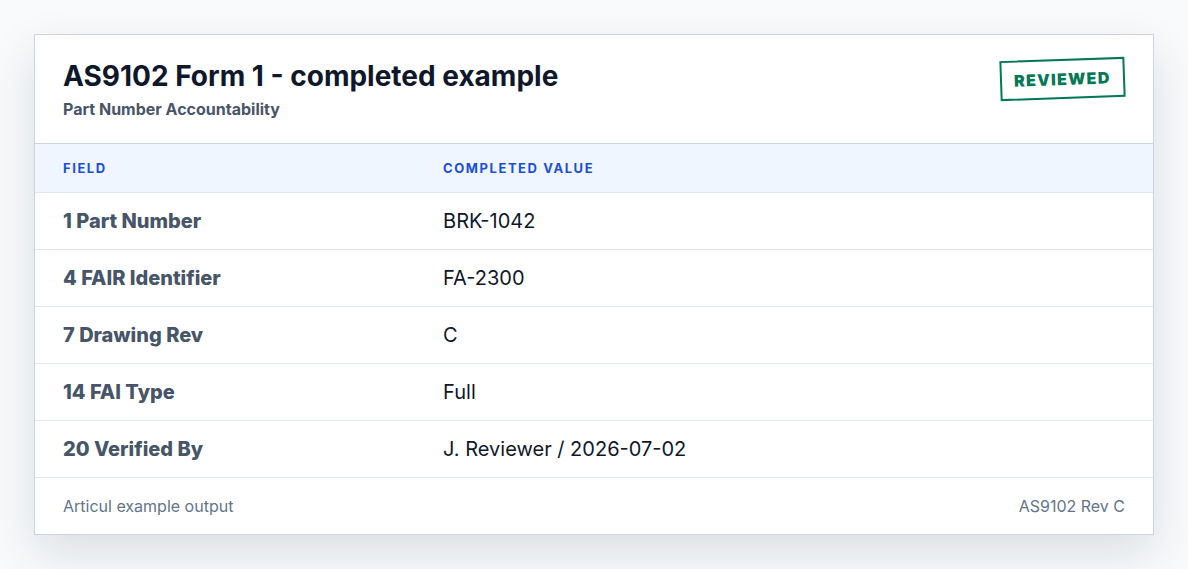
Step-by-step workflow
- Copy part number, part name, FAIR identifier, drawing number, and revisions from controlled sources.
- State whether the FAIR is full or partial and identify the baseline for partial work.
- Complete assembly fields only when they apply to the part and customer requirement.
- List documented nonconformances or state that none are present.
- Verify signatures and dates after Form 2 and Form 3 are complete.
Field guide
Field 1 - Part Number
Required. Example: BRK-1042. Match drawing and purchase order.
Field 2 - Part Name
Required. Example: Mounting Bracket. Use the engineering definition name.
Field 3 - Serial Number
Conditional. Example: SN-0007. Required when the part is serialized.
Field 4 - FAIR Identifier
Required. Example: FA-2300. Use a unique report identifier.
Field 5 - Part Revision Level
Conditional. Example: C. Required when the part has a revision.
Field 6 - Drawing Number
Conditional. Example: DWG-BRK-1042. Required when defined separately.
Field 7 - Drawing Revision Level
Conditional. Example: C. Must match the inspected drawing.
Field 8 - Additional Changes
Conditional. Example: ECN-117. List unincorporated changes when applicable.
Field 9 - Manufacturing Process Reference
Required. Example: WO-88421. Work order or traveler reference.
Field 10 - Organization Name
Required. Example: Acme Aerospace. Supplier or internal organization.
Field 11 - Supplier Code
Optional. Example: ACM001. Use customer-assigned code when required.
Field 12 - Purchase Order Number
Optional. Example: PO-77812. Customer PO or contract reference.
Field 13 - Detail / Assembly FAI
Required. Example: Detail. Identify whether this FAIR covers a detail or assembly.
Field 14 - Full / Partial FAI
Required. Example: Full. Partial FAIRs must identify the baseline.
Field 15 - Assembly Part Number
Conditional. Example: ASM-9001. Use when this detail rolls into an assembly FAIR.
Field 16 - Assembly Part Name
Conditional. Example: Actuator Assembly. Required when field 15 applies.
Field 17 - Assembly Part Type
Conditional. Example: Sub-assembly. Required when field 15 applies.
Field 18 - Assembly FAIR Identifier
Conditional. Example: FA-2294. Link to the higher-level FAIR.
Field 19 - Documented Nonconformance(s)
Required. Example: None. List NC records or state none.
Field 20 - FAIR Verified By
Required. Example: J. Reviewer. Person who verified the FAIR.
Field 21 - FAIR Verified Date
Required. Example: 2026-07-02. Date of verification.
Field 22 - FAIR Reviewed / Approved By
Required. Example: M. Quality. Approver or reviewer.
Field 23 - FAIR Reviewed / Approved Date
Required. Example: 2026-07-02. Date of approval.
Field 24 - Customer Approval
Conditional. Example: N/A. Required when purchase order or customer requires it.
Field 25 - Customer Approval Date
Conditional. Example: N/A. Date customer approved the FAIR.
Field 26 - Comments
Optional. Example: First production run.. Use for context, not missing required data.
Partial FAI example wording
For a partial FAI, identify the previous FAIR or baseline part revision and summarize the triggering change. Example: Partial FAI against FA-2290 Rev B; covers ECN-117 bracket hole pattern change.
Related AS9102 resources
Frequently asked questions
When do assembly fields apply on Form 1?
Assembly fields apply when the detail part belongs to an assembly-level FAIR or when the customer requires the relationship to be documented.
Can Form 1 be signed before Form 3 results are complete?
No. Signing before characteristic results and evidence are complete turns the signature into a process shortcut instead of a verification record.
Changelog
July 2, 2026: Published the AS9102 Rev C page, download assets, completed example image, FAQ schema, and sitemap entry.
Turn the template into a reviewed FAIR package
Articul pre-fills Forms 1-3 from the print and routes anything uncertain to you, including drawing notes and title-block fields, while tying ballooned characteristics to source regions before export.
Upload a drawingHosted upload is for non-controlled drawings only. Do not upload export-controlled (ITAR/EAR) technical data to hosted; ask about self-host.